See how much your agents work for you.
Agent time adds up quietly. Trilbio's Activity page shows when your agents worked, on which projects, and how many hours they put in while you weren't at your desk.
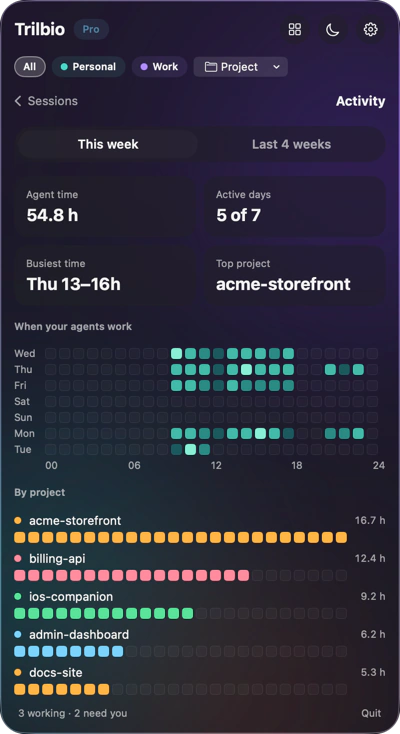
This week, hour by hour
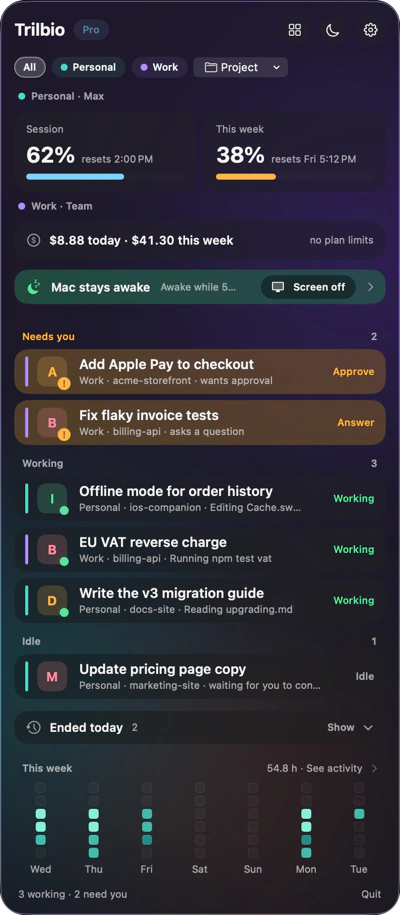
A heatmap of the week by day and hour, drawn as the same rounded blocks you see in the panel's week strip. Brighter means more agent time; parallel agents add up.
- Active days and total agent time
- Your busiest time of day
- Hours your agents worked while you were away
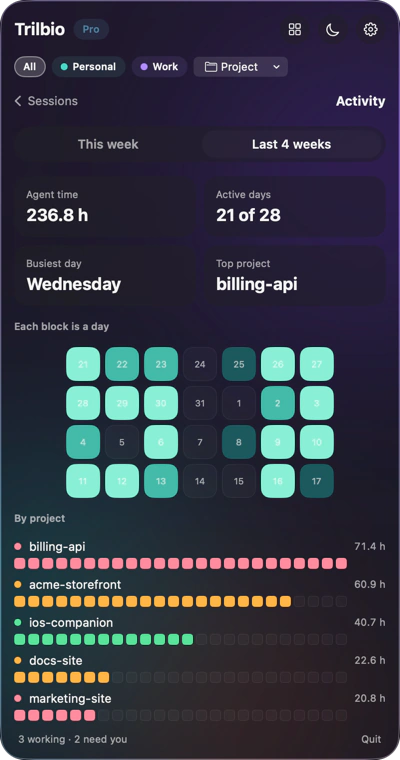
Four weeks, per project
Zoom out to the last four weeks, a block per day, and see where the time went with a bar per project in that project's own colour.
- Time per project
- Filter by project or by account
- History from before you installed Trilbio
What counts as agent time
Every minute in which a session wrote to its transcript. Two agents working in the same minute count as two minutes.
Starts with history
Trilbio reads the transcripts Claude Code already keeps, so the last four weeks fill in right after you install it.
Stays on your Mac
Activity is computed and cached locally. It's never uploaded, synced or shared.
Questions about activity
How can I see how much Claude Code works for me?
Trilbio's Activity page shows agent time per day and hour, per project, and while you were away, for up to four weeks back. It's calculated from Claude Code's own session history on your Mac.
Does Activity include sessions from before I installed Trilbio?
Yes, up to four weeks back, because it reads the transcripts Claude Code already stores.
Is my activity data uploaded anywhere?
No. It's computed and stored on your Mac only.
Is Activity part of Pro?
Yes. The week strip and Activity page are part of Pro, free for the first 7 days.

Let your agents work. Trilbio keeps watch.
Free to download, every Pro feature free for the first 7 days, then a one-time €12.99 if you want to keep them. Nothing is charged automatically.
Requires macOS 26 or later. Works with Claude Code today; Codex, Gemini CLI and Cursor are coming.