Your Mac stays awake while your agents work.
Leave your desk and your Mac goes to sleep, and so do your agents. Trilbio keeps it awake exactly as long as they run, then lets it sleep normally.
Three modes, sensible guards
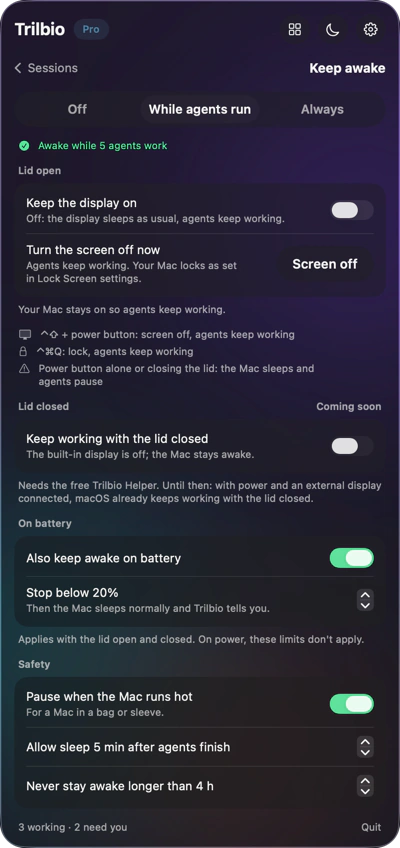
Pick While agents run (the default), Always or Off. "While agents run" keeps your Mac awake from the first active session until the last one is finished, plus a short grace period.
- On battery: stop below a percentage you choose, or only keep awake on power
- Heat: pause when your Mac runs hot
- Time: never stay awake longer than a maximum you set
- Display: keep the screen on too, or let it dim
Screen off, agents on
Want the screen dark while you're away? Press Screen off in the panel. The display turns off and your Mac locks as set in Lock Screen settings, while the system stays awake and your agents keep working.
- Works with the lid open
- Your Mac locks as usual, so it's safe to walk away
- Normal sleep returns as soon as your agents are done
Ways to go dark
- Screen off in Trilbio's panel or keep-awake page
- Control Shift + power button
- Control Command Q to lock
Your agents keep working in all three. The power button alone, or closing the lid, still puts the Mac to sleep.
Lid closed: coming soon. Closing the lid (without an external display) is a sleep request macOS always honours, even for apps that keep the Mac awake. Keeping agents working with the lid closed needs a small, separately installed helper. It's in the works and will come with the same guards: power adapter only, lock on close, and a pause when the Mac gets hot.
Better than caffeinate
No Terminal command to remember and none to forget: Trilbio knows when your agents are actually working, and stops the moment they're done.
See it at a glance
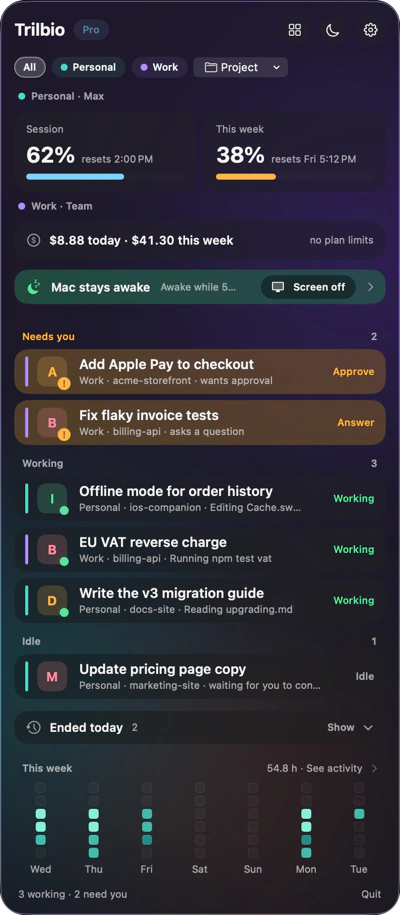
A banner in the panel tells you whether your Mac is being kept awake and why. Tap it to change the settings.
Built the Apple way
Trilbio uses macOS's own power assertions, the same mechanism a video player uses. Sandboxed, no admin password.
Questions about keeping your Mac awake
How do I keep my Mac awake while Claude Code is running?
Install Trilbio and leave keep awake on "While agents run". Your Mac then stays awake from the moment an agent starts working until all agents are finished (plus a short grace period) and sleeps normally after that.
Can I turn off the screen and keep Claude Code running?
Yes. Use Screen off in Trilbio's panel. The display goes dark and your Mac locks, but the system stays awake so your agents keep working.
Does Trilbio keep agents running with the lid closed?
Not yet. With the lid closed and no external display, macOS sleeps regardless of what apps ask. A separate helper that makes this possible is coming soon.
Will keep awake drain my battery?
You decide. Trilbio can keep your Mac awake only on the power adapter, or stop below a battery percentage you choose (20% by default). It also pauses when your Mac runs hot and never stays awake longer than the maximum you set.

Let your agents work. Trilbio keeps watch.
Free to download, every Pro feature free for the first 7 days, then a one-time €12.99 if you want to keep them. Nothing is charged automatically.
Requires macOS 26 or later. Works with Claude Code today; Codex, Gemini CLI and Cursor are coming.