Your Claude usage limits, always in sight.
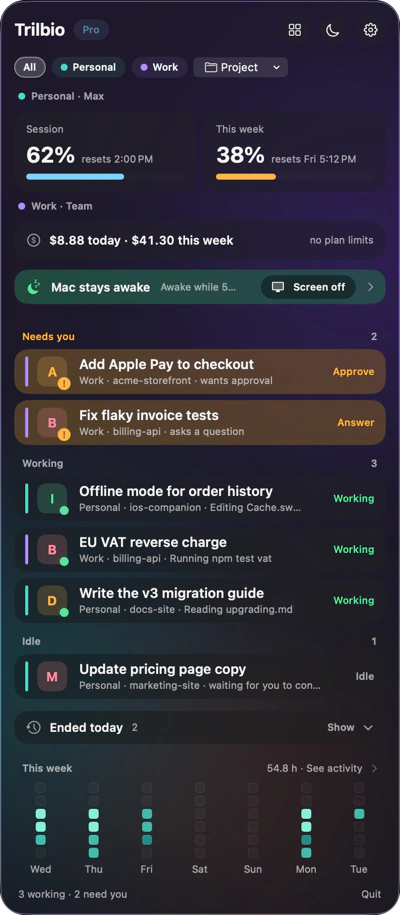
Claude Code works within a 5-hour session limit and a weekly limit. Trilbio shows both, tells you when they reset, and warns you before you hit the wall halfway through a task.
Two bars, two reset times
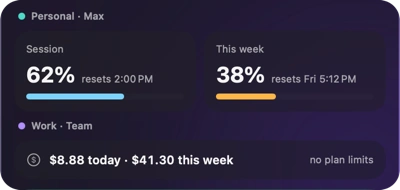
At the top of the panel, each Claude profile gets its own limit tiles: the 5-hour session window in the accent colour, the weekly window in amber. Both turn red from 90%. Next to each bar: when it resets. A profile on a plan without these limits shows what it cost today and this week instead.
- 5-hour session usage with its reset time
- Weekly usage with its reset day and time
- An alert at the threshold you choose
- Cost per session in the session detail
Plan your big tasks
Starting a large refactor at 85% of your session limit is a gamble. With the numbers in your menu bar you know whether to start now or after the reset.
Several accounts
Use a personal and a work profile? Each gets its own limits, colour and filter, so you can see which account still has room.
Read locally
Claude Code hands the limit percentages and reset times to its status line. Trilbio reads them there, on your Mac, and still runs your own status line. It never logs in to your Claude account.
Questions about usage limits
How does Trilbio know my Claude Code usage limits?
Recent versions of Claude Code pass your 5-hour and weekly usage (percentage and reset time) to the status line. When you connect Trilbio you can let it wrap your status line: it reads those numbers locally and then runs your own status line as before.
Does Trilbio need my Claude login to show limits?
No. Trilbio never reads your credentials or Keychain and never contacts Anthropic. The numbers come from Claude Code itself, on your Mac.
What happens when a limit resets?
A window whose reset time has passed shows 0% ("starts with your next message") until Claude Code reports fresh numbers.
Are limits a Pro feature?
Yes. Limits, costs and usage alerts are part of Pro, which is free for the first 7 days and a one-time €12.99 after that.

Let your agents work. Trilbio keeps watch.
Free to download, every Pro feature free for the first 7 days, then a one-time €12.99 if you want to keep them. Nothing is charged automatically.
Requires macOS 26 or later. Works with Claude Code today; Codex, Gemini CLI and Cursor are coming.